



Discover Planner 5D: The Ultimate Home Design Tool
Planner 5D is an innovative home design software that allows anyone to create stunning 2D and 3D floor plans. Whether you are a homeowner planning renovations, a DIY enthusiast redesigning a room, or a professional interior designer, Planner 5D makes visualizing your ideas simple and intuitive. Its drag-and-drop interface allows you to add walls, doors, windows, furniture, and décor easily, while AI-assisted suggestions provide optimized layouts and color schemes to make every design functional and beautiful.
With Planner 5D, you can start in 2D mode to map out exact measurements, then switch instantly to 3D mode to see your design come to life in a realistic setting. The software’s flexibility allows you to plan single rooms, multiple floors, or entire homes. Cross-platform support ensures you can work on desktop, tablet, or mobile, and cloud saving lets you continue your project from anywhere. Planner 5D turns complicated design projects into an enjoyable and creative process.
Key Features That Make Planner 5D Stand Out
Planner 5D offers a powerful set of features that make it one of the most versatile home design tools available. Its AI-assisted layout suggestions help users place furniture optimally and create balanced, functional spaces. The platform has an extensive furniture and décor catalog, with thousands of items that can be resized, rotated, and customized to fit any room.
The software also supports AR and VR visualization, so you can preview your design in real life or experience immersive virtual walkthroughs. Pre-designed templates make it easy to start quickly, while mood boards allow you to experiment with colors, textures, and materials. Planner 5D’s cross-device functionality means you can switch between desktop, tablet, and mobile seamlessly, with projects saved automatically in the cloud.
Whether you are a beginner or a professional, Planner 5D combines ease of use, advanced technology, and creative flexibility, making it a standout solution for anyone looking to bring their home design ideas to life.
Step-by-Step Guide to Creating Stunning Floor Plans
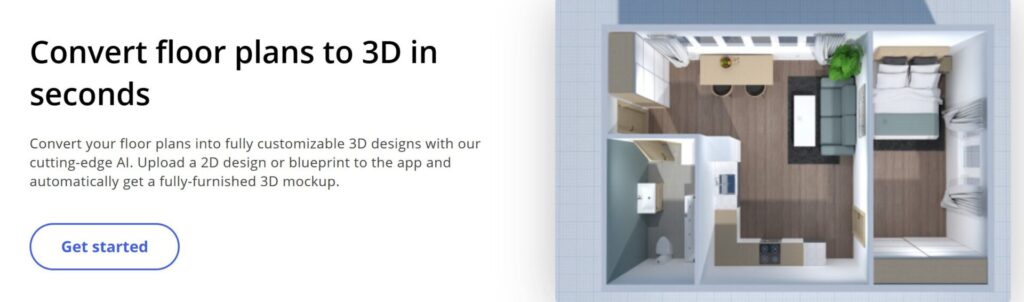
Creating a floor plan in Planner 5D is simple and intuitive. Start by building a 2D layout, defining your walls, doors, and windows to ensure accurate dimensions. Next, add furniture and decorative elements from the catalog, adjusting size and placement for the perfect fit. Switching to 3D mode lets you see the space from every angle, walk through rooms virtually, and understand how furniture interacts with walls and lighting.
Experiment with colors, textures, and materials to see how different combinations affect the overall design. Planner 5D’s AI suggestions provide optimized layouts and color palettes to help you make decisions faster and smarter. Finally, you can create photorealistic images or video walkthroughs to share your designs with family, clients, or contractors. With Planner 5D, designing your dream home becomes both easy and enjoyable.
Using Planner 5D for Room-Specific Interior Design
Planner 5D allows detailed customization for every room. In living rooms, you can test sofa and table arrangements, experiment with rugs and lighting, and try different color schemes for walls and décor. In kitchens, place cabinets, countertops, and appliances accurately while optimizing workflow and accessibility. Bedrooms benefit from flexible bed and storage arrangements, different lighting scenarios, and color experimentation. Bathrooms can be designed with precise fixture placement and realistic tile and wall previews.
Planner 5D also provides inspiration galleries and pre-designed layouts to spark creativity. You can save multiple versions of a room to explore different furniture arrangements, décor combinations, and styles—from modern minimalism to classic elegance. By offering a risk-free virtual environment, Planner 5D empowers users to create functional, beautiful spaces without trial-and-error in the real world.
Planner 5D for DIY Renovations and Home Projects
DIY enthusiasts can rely on Planner 5D to plan renovations efficiently. Accurately measure rooms, test furniture arrangements, and simulate material or layout changes before committing to purchases. This prevents costly mistakes and ensures that your vision translates perfectly to reality. For example, redesigning a kitchen allows multiple cabinet layouts, countertop materials, and appliance placements to be tested virtually.
Planner 5D supports multi-floor designs, so entire homes can be planned in one project. Collaboration is simple—you can share your designs with family members, contractors, or interior designers for feedback. Additionally, experimenting with colors, textures, and lighting ensures your renovations are both functional and aesthetically pleasing. With Planner 5D, DIY projects become manageable, creative, and highly satisfying.
Pricing, Accessibility, and Why Planner 5D is Worth It
Planner 5D is available with a freemium plan, giving access to basic design tools and limited furniture items. Premium subscriptions unlock the full catalog, AI-assisted features, HD rendering, and video walkthroughs, allowing users to create realistic, professional-quality designs.
The software is accessible on desktop, tablet, and mobile, with tutorials and inspiration galleries to simplify the learning process. Compared to competitors, Planner 5D stands out for its user-friendly interface, AI-powered suggestions, and cross-platform flexibility. Whether you’re designing a single room or executing a full-scale renovation, Planner 5D provides all the tools, inspiration, and confidence to turn ideas into reality. It combines creativity, technology, and practicality in a way that makes home design accessible, enjoyable, and highly effective.