


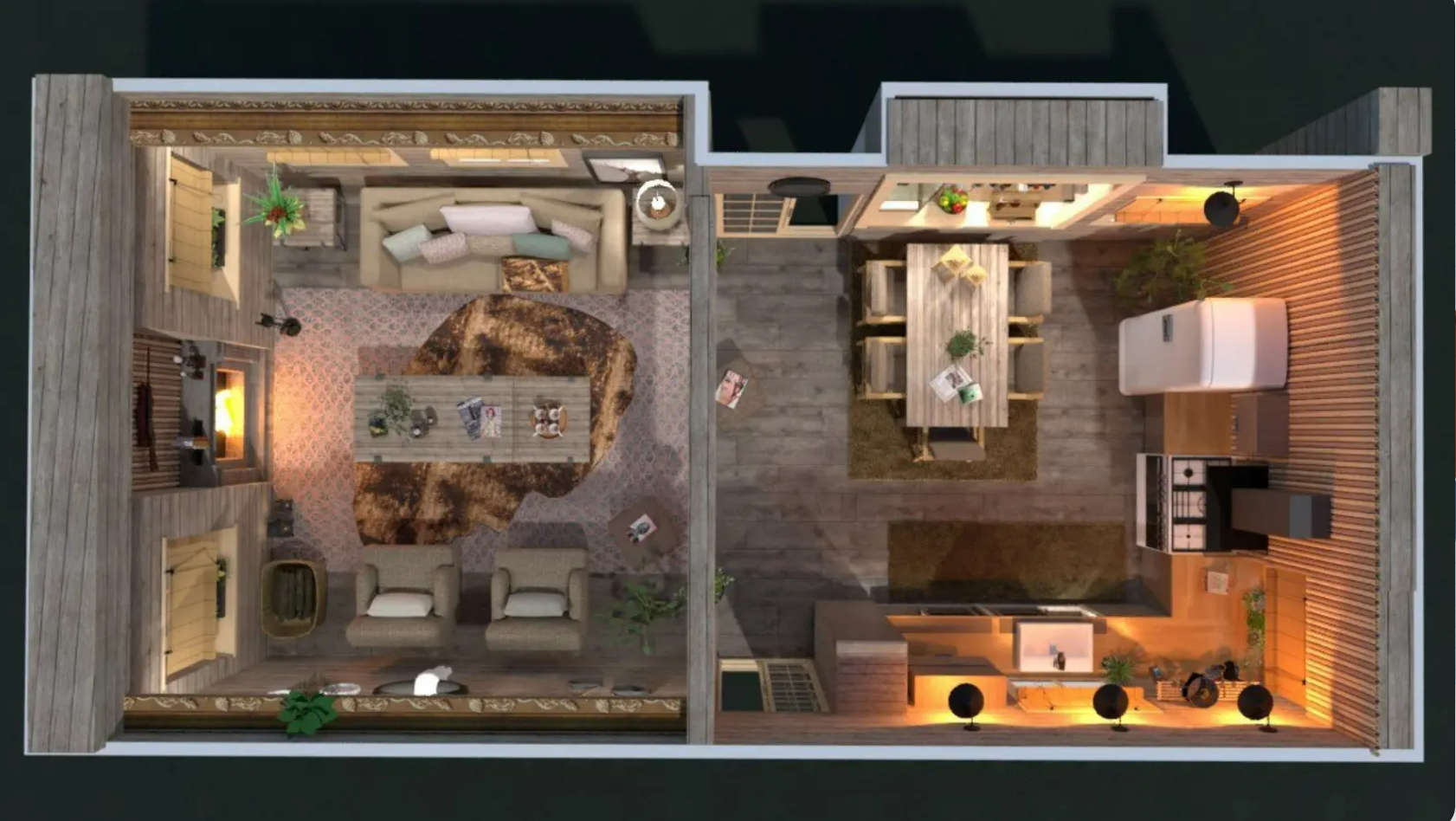
Create Stylish Small Spaces With Planner 5D Interior Design Tools
Designing a beautiful home does not always require a large floor area or an expensive renovation. With thoughtful planning, even a compact apartment or a small room can become comfortable, attractive, and highly functional. The key is to use available space efficiently while maintaining a consistent interior style. Planner 5D offers digital home design tools that help users explore different layouts, arrange furniture, and visualize their ideas before making changes in real life.
Modern living often involves making the most of limited space. Apartments, studio homes, and smaller houses require careful decisions about furniture size, storage, lighting, and room organization. A poorly planned layout can make a room feel crowded, while an effective arrangement can improve movement and create a more open atmosphere.
Planner 5D helps users develop digital representations of their interiors and experiment with different design possibilities. Users can begin with a basic floor plan, add furniture, and explore how different elements work together. This visual approach makes it easier to compare ideas and identify arrangements that suit the available space.
For example, a small living room may need to accommodate a sofa, a television unit, a coffee table, and storage. By testing different positions digitally, users can determine which arrangement leaves enough room for comfortable movement. Similarly, a compact bedroom can be planned around an appropriately sized bed, a wardrobe, and practical bedside storage.
Visual planning also encourages users to think carefully about the relationship between functionality and appearance. Instead of filling every empty corner with furniture, they can focus on pieces that serve a clear purpose. A well-positioned mirror, a compact shelf, or a carefully selected lighting fixture may improve the room without creating unnecessary clutter.
The goal is to create an interior that feels balanced rather than crowded. By combining practical planning with personal creativity, users can explore attractive design ideas that make smaller living spaces feel more organized and welcoming.
Optimize Compact Room Layouts With Planner 5D Floor Planning Features

A functional layout is essential when designing a space-saving home. Furniture that blocks a doorway, a table that interrupts a walking path, or a wardrobe that is difficult to access can reduce the usefulness of a room. Floor planning helps users organize these elements before purchasing furniture or beginning a renovation.
Planner 5D provides digital floor planning capabilities that allow users to create room layouts and explore different arrangements. Users can plan individual areas, including bedrooms, kitchens, bathrooms, living rooms, and home offices. Starting with the room’s dimensions provides a foundation for arranging furniture according to the available space.
Small living rooms often benefit from a layout that prioritizes essential furniture. A compact sofa positioned against a wall may leave more open floor space than a large sectional. A narrow console or wall-mounted storage unit can provide functionality without occupying as much room as bulky furniture.
Bedrooms require similar attention. Positioning the bed carefully can improve access to wardrobes and windows while making space for other necessary items. In smaller rooms, furniture with built-in drawers can provide additional storage without requiring a separate cabinet.
Kitchen layouts should also support everyday activities. Users can plan cabinet positions, appliance locations, and preparation areas while considering the space needed to open doors and move comfortably. Even minor changes in the arrangement can influence how convenient the kitchen feels.
Accurate measurements are important throughout the process. Users should record wall dimensions, door openings, window positions, and other fixed features. Furniture measurements should also be checked before finalizing an arrangement. A digital design is most useful when it reflects the actual room as closely as possible.
Another advantage of digital floor planning is the ability to compare alternatives. Users can test different furniture arrangements and review which option makes the best use of the available area. This process encourages thoughtful decisions and helps create interiors that combine visual appeal with practical everyday use.
Visualize Elegant Home Interiors With Planner 5D 3D Design Technology
Understanding the appearance of a room before decorating it can be challenging. Measurements and simple drawings communicate dimensions, but they may not show the complete visual effect of furniture, colors, and materials. Three-dimensional visualization provides a more detailed perspective, helping users evaluate their design ideas before making physical changes.
Planner 5D supports 2D and 3D design workflows that allow users to create floor plans and explore their proposed interiors visually. The two-dimensional view is useful for arranging objects and reviewing room dimensions, while the three-dimensional view provides a better sense of depth, proportion, and overall appearance.
This feature can be especially useful when designing compact homes. A piece of furniture might fit within the room’s measurements but still make the space appear crowded. Viewing the arrangement in three dimensions can help users identify these issues and explore alternatives.
For example, a small dining area may look more spacious when furnished with a compact table and appropriately sized chairs. A narrow bedroom might benefit from a simple furniture arrangement that keeps the central floor area open. Digital visualization helps users compare these ideas before making a purchase.
Color selection is another important part of interior design. Light shades such as cream, soft gray, and pale beige can contribute to a bright visual appearance. Natural wood finishes may introduce warmth, while carefully chosen accent colors can add personality. Users can experiment with different combinations to identify a style that complements their preferences.
Lighting also affects the atmosphere of a room. Natural light, ceiling fixtures, floor lamps, and task lighting each serve different purposes. A well-planned lighting arrangement can make a compact room feel more comfortable and support activities such as reading, cooking, or working.
Three-dimensional previews provide useful visual guidance, although actual results may vary depending on real lighting conditions, material finishes, and product dimensions. Users should verify important details before making final decisions.
By exploring their designs from different perspectives, users can develop a clearer understanding of their preferred interior style and create layouts that feel coordinated, comfortable, and visually appealing.
Choose Multifunctional Furniture With Planner 5D Space-Saving Design Ideas
Furniture selection plays a major role in making compact homes more functional. In a smaller room, every item should contribute to comfort, storage, or everyday activities without unnecessarily occupying valuable floor space. Multifunctional furniture can be particularly useful because it allows one piece to serve several purposes.
Planner 5D helps users visualize furniture within a planned room, making it easier to compare sizes, arrangements, and styles. By adding furniture to a digital design, users can evaluate how individual pieces interact with the available space before deciding what to purchase.
A storage bed is one example of multifunctional furniture. It can provide sleeping space while offering drawers or compartments for bedding, clothing, and other belongings. Similarly, an extendable dining table can accommodate everyday meals and provide additional seating when guests visit.
In a living room, an ottoman with internal storage can serve as a footrest, an occasional seat, and a place to keep small items. A compact desk may also function as a study area and a workspace, particularly when combined with shelves that use vertical space efficiently.
Wall-mounted furniture can help preserve open floor areas. Floating shelves, wall-mounted desks, and appropriately installed television units can reduce the need for bulky furniture. However, users should consider wall construction, load limits, and suitable installation methods before mounting heavy objects.
Furniture size should always match the room’s dimensions. A multifunctional item is only useful if it can be accessed comfortably and does not interfere with movement. Users should allow enough space for drawers, cabinet doors, and folding furniture to operate properly.
A consistent visual style can also make a compact room feel more organized. Selecting furniture with complementary finishes, simple shapes, and coordinated colors helps reduce visual clutter. This does not mean every item must match exactly; a few contrasting details can create interest without overwhelming the space.
By planning furniture arrangements digitally, users can identify which items are necessary, compare different options, and build an interior that combines flexibility, functionality, and style.
Improve Storage Efficiency With Planner 5D Smart Interior Planning

Storage is one of the most important considerations in a space-saving home. Without a clear organization strategy, everyday belongings can accumulate on countertops, floors, and furniture surfaces. A well-planned storage system helps maintain a tidy appearance while ensuring frequently used items remain accessible.
Planner 5D allows users to incorporate storage furniture and other interior elements into their digital designs. This makes it possible to explore different arrangements and consider storage requirements alongside the overall room layout.
Vertical storage is particularly useful in smaller homes. Shelves, tall cabinets, and wall-mounted organizers can make use of wall space while preserving more of the floor area. In a bedroom, a tall wardrobe may offer more storage than a wide, low cabinet. In a home office, shelves above a desk can keep books and supplies organized without occupying additional floor space.
Living rooms can benefit from furniture that combines storage with another function. Coffee tables with compartments, media units with cabinets, and benches with internal storage can help reduce clutter. However, users should avoid adding too many storage units, as excessive furniture can make the room feel crowded.
Kitchens require careful organization because many different items need to remain accessible. Cabinets, drawers, and shelves can be planned around cooking routines and available space. Frequently used utensils should be easy to reach, while less frequently used equipment can be stored in less accessible areas.
Bathrooms can also benefit from compact storage solutions. Narrow shelving, mirrored cabinets, and organizers beneath a suitable vanity can help keep toiletries and cleaning supplies arranged neatly. Moisture resistance and appropriate installation should be considered when selecting real products.
Storage planning should reflect the habits of the people living in the home. A family may need space for toys, school supplies, and seasonal belongings, while someone working remotely may require shelves for books, files, and office equipment.
A digital plan helps users visualize where these storage elements might fit and whether they interfere with other furniture. By planning storage early, homeowners can create rooms that remain organized without sacrificing comfort or appearance.
Refresh Modern Living Spaces With Planner 5D Color And Decor Planning
Color and decoration can transform a room without requiring major structural changes. The right combination of wall shades, fabrics, lighting, and accessories can create a more spacious visual impression and establish a distinctive interior style. In smaller homes, thoughtful decoration is particularly valuable because excessive visual detail can make a room feel busy.
Planner 5D provides a digital environment where users can explore interior arrangements and experiment with decorative elements. Users can develop a color palette, position furniture, and review how different design choices work together.
Neutral shades are often useful when creating a bright, flexible interior. White, cream, beige, and soft gray can provide a calm background for furniture and accessories. These colors can also work well with natural materials, such as wood and woven textures, to create a warm and welcoming atmosphere.
Accent colors can introduce personality without overwhelming the room. For example, cushions, artwork, rugs, or decorative objects in a contrasting shade can add visual interest. Repeating a small number of colors across different elements can help the interior feel coordinated.
Mirrors can influence the perception of space by reflecting light and creating additional visual depth. Their placement should be considered carefully to avoid unwanted reflections or an overly busy appearance. Similarly, curtains that suit the window dimensions and allow sufficient natural light can contribute to a more open atmosphere.
Lighting should complement the room’s activities and decorative style. A ceiling fixture may provide general illumination, while a desk lamp or bedside light can support specific tasks. Warm lighting can create a relaxed atmosphere in living areas, while brighter task lighting may be useful in kitchens and workspaces.
Accessories should be selected with purpose. Too many decorative objects can create clutter, particularly in a compact room. A few well-chosen pieces often provide a more balanced result than filling every available surface.
Digital design tools allow users to test different color and decor combinations before buying paint, textiles, or accessories. This makes it easier to compare styles and refine the room’s appearance while keeping the design aligned with personal preferences.
Organize Home Makeovers With Planner 5D Interior Design Workflow
A successful home makeover requires more than a collection of attractive design ideas. It involves organizing priorities, measuring spaces, selecting suitable furnishings, and reviewing how every element contributes to the final result. A structured workflow can make the process easier to manage and help users avoid unnecessary changes.
Planner 5D can support this process by allowing users to develop floor plans, arrange furniture, and visualize their interiors digitally. The first step is identifying the purpose of each room. A bedroom may need to prioritize rest and storage, while a living room may require flexible seating and an open area for movement.
The next step is preparing a floor plan using accurate measurements. Users should record the position of doors, windows, and fixed architectural features before adding furniture. This provides a more reliable foundation for comparing different layouts.
Once the basic layout is established, users can experiment with furniture placement and storage solutions. They should focus on essential items first and add optional pieces only when enough space remains. This approach helps keep the design practical and prevents overcrowding.
The following stage involves selecting colors, materials, lighting, and decorative accessories. Keeping a consistent theme can make the room feel more harmonious, while a few contrasting details can create visual interest. Users can review the design in 2D and 3D to understand both the layout and the overall appearance.
Budget planning should be part of the workflow from the beginning. Users can prepare a list of necessary items, compare prices, and decide which improvements should receive priority. Existing furniture may be reused or refreshed where appropriate, reducing the need for unnecessary purchases.
Before completing the design, users should review measurements, walking paths, storage capacity, and furniture accessibility. They should also confirm that selected products fit the real room and meet practical requirements. Structural changes, electrical installations, and other technical work may require professional advice.
Where supported, saving project versions can help users compare different ideas and return to earlier designs. Users should check their available account features before relying on particular project-sharing or synchronization options.
By following an organized process, homeowners can turn inspiration into a practical plan. Planner 5D provides a visual way to explore interior ideas, use space efficiently, and develop attractive living environments that balance comfort, organization, and personal style.