


Creating a vision that feels like home
Every beautiful interior begins with a clear vision. Before opening any design tool, the most important step is to understand what kind of space you truly want to live in. A professional designer does not start by placing furniture; they start by imagining how a space should feel. Is it calm and minimal, warm and inviting, bold and artistic, or modern and sleek? This emotional direction becomes the foundation for every design decision that follows.
When using Planner 5D, this vision becomes even more powerful because the platform allows you to translate your imagination into a visual layout instantly. Begin by exploring different styles and identifying what resonates with you. Think about colors that bring you comfort, textures that appeal to your senses, and layouts that match your lifestyle. A small apartment may require smart storage solutions, while a larger home may allow for more expressive design choices.
Once your vision is clear, you can begin to shape it digitally. Open Planner 5D and start with a blank canvas or a template that closely matches your space. Focus on the structure first rather than the details. Create walls, define room sizes, and map out the overall layout. This stage is about building the skeleton of your design, ensuring that proportions and flow feel natural.
The beauty of this process lies in experimentation. You are not bound by physical limitations, so you can test different layouts without fear. Move walls, expand rooms, or adjust dimensions until everything aligns with your vision. This is where creativity meets practicality, allowing you to think like a professional designer who balances aesthetics with functionality.
As your layout takes shape, you begin to see your dream space come to life. The vision that once existed only in your mind now has form and structure. This is the moment where designing becomes exciting, as each decision brings you closer to a home that feels uniquely yours.
Building a smart and functional layout
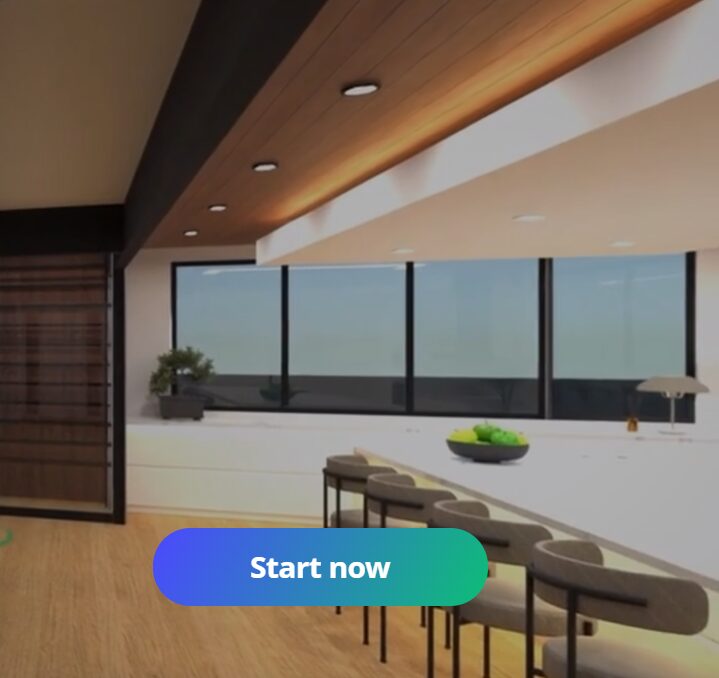
A stunning interior is not just about how it looks but also about how it works. Functionality is the secret ingredient that separates amateur designs from professional ones. In Planner 5D, this step involves refining your layout to ensure that every inch of space is used effectively.
Start by considering movement within the space. Imagine walking through your home and observe how easily you can move from one area to another. Doors should open without obstruction, pathways should feel natural, and furniture placement should never create barriers. Professionals always design with flow in mind, ensuring that the space feels effortless to navigate.
Next, think about purpose. Every room should have a clear function, and every piece of furniture should support that purpose. In your living room, for example, seating should encourage conversation and relaxation. In a bedroom, the layout should promote comfort and rest. Planner 5D allows you to experiment with different arrangements until you find the perfect balance.
Scale and proportion also play a crucial role. A common mistake is choosing furniture that is either too large or too small for the space. With Planner 5D’s 3D visualization, you can accurately assess how each item fits within the room. Adjust sizes, swap pieces, and refine your choices until everything feels harmonious.
Lighting is another essential element of functionality. Consider how natural light enters your space and how artificial lighting can enhance it. Position windows strategically and add light fixtures that serve both practical and aesthetic purposes. A well-lit room not only looks better but also feels more inviting.
As you refine your layout, you begin to think like a designer who prioritizes both beauty and usability. This stage transforms your design from a simple idea into a livable space, ensuring that your interior is as comfortable as it is visually appealing.
Selecting colors and textures with confidence
Color is one of the most powerful tools in interior design. It has the ability to influence mood, define space, and create visual harmony. When working in Planner 5D, choosing the right color palette becomes an exciting step that brings personality to your design.
Start with a base color that reflects the overall mood you want to achieve. Neutral tones create a calm and timeless atmosphere, while bold colors add energy and character. Once your base is established, introduce complementary shades to add depth and interest. The key is balance, ensuring that no single color overwhelms the space.
Textures add another layer of richness to your design. Smooth surfaces, soft fabrics, natural materials, and metallic finishes all contribute to the overall feel of a room. In Planner 5D, you can experiment with different materials to see how they interact with light and color. This allows you to create a space that feels dynamic and visually engaging.
Contrast is an important principle to keep in mind. Pairing light and dark elements, soft and hard textures, or matte and glossy finishes can make your design more interesting. However, it is important to maintain harmony so that the space does not feel chaotic. Professionals often follow a consistent theme to ensure cohesion throughout the design.
As you refine your color and texture choices, step back and view your design as a whole. Planner 5D’s 3D mode allows you to see how everything comes together in a realistic setting. This perspective helps you identify areas that may need adjustment, ensuring that your design feels balanced and intentional.
By the end of this stage, your space begins to reflect your personal style. Colors and textures work together to create an atmosphere that is both beautiful and meaningful, turning your design into a true expression of who you are.
Bringing life through furniture and decor
Furniture and decor are the elements that give your space character and identity. In Planner 5D, this step allows you to transform an empty layout into a fully realized interior that feels alive and inviting.
Begin by selecting key furniture pieces that define each room. These are the items that anchor your design, such as a sofa in the living room, a bed in the bedroom, or a dining table in the kitchen. Choose pieces that align with your overall style and fit comfortably within your layout.
Once the main furniture is in place, you can start layering additional elements. Add rugs to define areas, curtains to soften the space, and decorative items to enhance visual interest. Planner 5D offers a wide range of options, allowing you to experiment with different combinations until you find what works best.
Decor is where your personality truly shines. Artwork, plants, and accessories can turn a simple room into a space that feels unique and personal. The key is to avoid overcrowding. Professionals understand the importance of negative space, allowing each element to stand out without competing for attention.
Balance and symmetry are important considerations during this stage. Arrange furniture and decor in a way that feels visually pleasing and harmonious. This does not mean everything has to be perfectly symmetrical, but there should be a sense of order and intention in your design.
As you finalize your furniture and decor, take advantage of Planner 5D’s realistic rendering features. Viewing your design in high quality helps you see how different elements interact, making it easier to make adjustments and refine your choices.
This stage is where your design truly comes to life. Each piece you add contributes to the overall story of your space, creating an environment that feels complete and thoughtfully designed.
Refining details for a professional finish

The final step in creating beautiful interiors is refinement. This is where small details make a big difference, elevating your design from good to exceptional. In Planner 5D, this stage involves reviewing your entire project and making adjustments to achieve a polished, professional look.
Start by examining your design from different angles. Use the 3D view to walk through your space and experience it as if you were physically there. Pay attention to how each room connects and whether the overall flow feels natural. This perspective often reveals areas that need improvement.
Focus on consistency throughout your design. Colors, materials, and styles should work together to create a cohesive look. If something feels out of place, consider replacing it with an element that better aligns with your theme. Professionals often refine their designs multiple times to achieve perfect harmony.
Lighting plays a crucial role in the final presentation. Adjust light intensity, placement, and color to enhance the mood of your space. Soft lighting can create a cozy atmosphere, while brighter lighting can make a room feel more open and energetic.
Details such as trims, finishes, and small accessories should not be overlooked. These elements add depth and sophistication to your design. In Planner 5D, you can experiment with different options to find the perfect combination that enhances your overall vision.
Finally, take a step back and evaluate your design as a whole. Ask yourself whether it reflects your original vision and whether it feels both beautiful and functional. This moment of reflection is essential in achieving a design that truly stands out.
By refining every detail, you transform your interior into a space that looks and feels professionally designed. The journey from concept to completion becomes a rewarding experience, allowing you to create a home that is not only visually stunning but also deeply personal.