



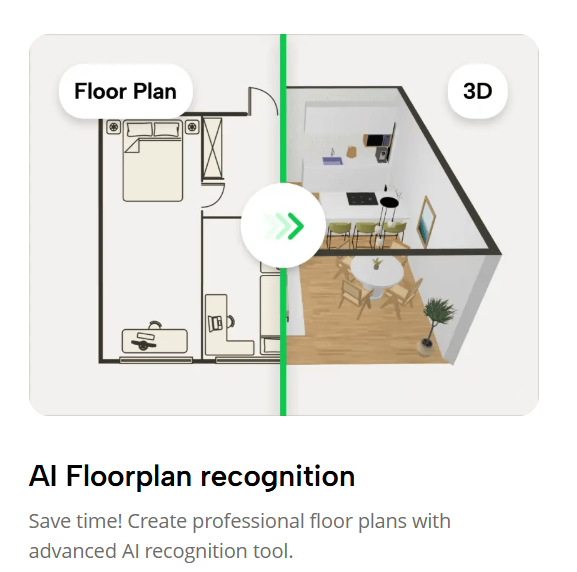
Planner5D has revolutionized the way homeowners, interior designers, and enthusiasts approach home design. This innovative platform allows anyone, whether a professional designer or a beginner, to create stunning floor plans, experiment with interior design, and visualize spaces in 3D. In today’s fast-paced world, where digital tools are essential, Planner5D stands out as one of the most user-friendly and versatile tools for turning ideas into reality. From creating a cozy apartment to designing a multi-story house, this guide will walk you through the key features, tips, and strategies to make the most of Planner5D.
Exploring the Power of Planner5D for Home Design
Planner5D is more than just a design tool; it is a platform that empowers users to explore creativity without limitations. At its core, Planner5D offers intuitive tools for home design, allowing users to draft detailed floor plans and decorate interiors in both 2D and 3D modes. One of the platform’s greatest advantages is its accessibility. You don’t need advanced software knowledge to start creating layouts, making it ideal for homeowners planning renovations, interior designers showcasing ideas to clients, or students learning the fundamentals of space planning.
The platform comes equipped with a vast library of furniture, appliances, and decorative items. Users can drag and drop elements into their designs, experiment with different layouts, and instantly see how spaces will look in reality. Color palettes, textures, and materials can also be customized, providing complete control over interior design choices. Whether you are designing a modern minimalist home, a traditional cozy living room, or a vibrant creative space, Planner5D adapts to your vision.
Moreover, Planner5D supports advanced features like realistic lighting simulation, multiple camera angles, and immersive 3D walkthroughs. This level of detail allows users to understand how sunlight, artificial lighting, and shadows will interact with the interior, ensuring a practical and aesthetically pleasing design. The platform also offers project sharing, allowing collaboration between clients, designers, and friends. For anyone passionate about home design, Planner5D serves as a virtual studio where ideas can come alive.
Crafting Detailed Floor Plans with Ease
Floor planning is an essential component of any home design project, and Planner5D makes it remarkably simple. The platform allows users to create floor plans from scratch or customize pre-existing templates. Walls, doors, windows, and staircases can be placed with precision, and measurements can be adjusted to reflect real-world dimensions. This ensures that your design is practical and feasible, saving time and reducing errors during actual construction or renovation.
Planner5D’s interface is designed to make floor planning intuitive. Users can toggle between 2D and 3D views seamlessly, enabling them to visualize spaces from both a top-down perspective and a realistic, immersive angle. This dual approach helps in planning efficient layouts, optimizing room sizes, and ensuring functional furniture arrangements. For example, you can experiment with open-concept living areas, maximize small apartment layouts, or design spacious multi-story homes.
Another valuable feature is Planner5D’s drag-and-drop tool for furniture and fixtures. Instead of imagining how a sofa or dining table fits in a room, you can place it virtually and adjust it as needed. This hands-on approach ensures that every element fits perfectly and contributes to the overall flow and harmony of the design. Additionally, Planner5D allows you to add notes, labels, and annotations to your floor plans, making it easier to communicate design intentions to contractors or collaborators.
Mastering Interior Design with Planner5D
Interior design is where Planner5D truly shines. The platform enables users to personalize every corner of a room, from wall colors and flooring to furniture styles and décor. With a rich catalog of items spanning modern, contemporary, classic, and eclectic styles, Planner5D allows experimentation without the risk of costly mistakes. Users can mix textures, combine patterns, and create a cohesive aesthetic that reflects their personality and lifestyle.
Lighting and materials play a critical role in interior design, and Planner5D offers tools to enhance both. Users can adjust natural and artificial lighting to see how it impacts the mood of a room. For instance, a warm-toned living area can be simulated to assess how sunlight streaming through large windows complements the furniture and décor. Similarly, users can explore flooring options, wall finishes, and fabrics to ensure that every element contributes to the overall design vision.
Planner5D also supports thematic projects, such as designing a home office, kid’s bedroom, or entertainment space. By experimenting in a virtual environment, users can refine their choices and identify the best arrangements for both aesthetics and functionality. This approach not only saves time but also provides confidence in design decisions, eliminating uncertainty before implementing them in the real world.
Visualizing Spaces in 3D Modeling
One of the most powerful features of Planner5D is its 3D modeling capabilities. Unlike traditional design software that relies on static 2D layouts, Planner5D brings projects to life through realistic 3D visualizations. Users can walk through their designs, rotate views, and experience the spatial dynamics as if they were physically present. This immersive experience provides an unparalleled perspective on home design, helping users understand proportions, sightlines, and the interplay of different elements.
3D modeling also enhances decision-making. Users can test different color schemes, furniture placements, and decorative choices while immediately seeing the impact on the room. Planner5D allows realistic simulations of shadows, reflections, and textures, making it easier to choose materials and finishes that complement each other. This level of detail is particularly valuable for professional interior designers, who can present clients with virtual walkthroughs to demonstrate concepts and ideas.
Additionally, Planner5D offers features such as virtual reality compatibility, enabling users to experience their designs in an even more immersive way. By using VR headsets, you can explore your home project at scale, walking through corridors, checking room proportions, and evaluating the flow between spaces. This interactive approach ensures that every design element is practical, visually appealing, and aligned with your vision.
Tips and Best Practices for Using Planner5D
To maximize the potential of Planner5D, it is essential to follow certain tips and best practices. Start by clearly defining your project goals and requirements. Whether you are redesigning a single room or planning an entire home, having a clear vision helps in selecting appropriate layouts, furniture, and décor elements. Use Planner5D’s templates as a starting point and customize them to suit your needs.
Experimentation is key. Planner5D allows you to try multiple design ideas without any cost or risk. Don’t hesitate to explore different furniture arrangements, color palettes, or material choices. Utilize the platform’s 3D modeling features to assess how your choices work in a realistic environment. Pay attention to lighting, as it significantly influences the overall mood and perception of spaces.
Collaboration is another advantage of Planner5D. Share your projects with friends, family, or clients to gather feedback. This collaborative approach can reveal insights you may not have considered and help refine your design. Additionally, Planner5D allows exporting and printing floor plans, which can be valuable for contractors or builders during implementation.
Finally, stay updated with Planner5D’s latest features and library updates. The platform frequently introduces new furniture items, textures, and tools to enhance the design experience. By keeping your skills current, you can leverage Planner5D to create innovative, beautiful, and functional home designs efficiently.
Planner5D is a comprehensive solution for anyone interested in home design, interior design, 3D modeling, and floor planning. Its user-friendly interface, versatile tools, and realistic visualizations make it an ideal choice for both beginners and professionals. By mastering Planner5D, users can bring their home visions to life, optimize layouts, experiment with décor, and confidently implement designs. Whether creating a small apartment or a large family home, Planner5D transforms ideas into tangible, immersive experiences, making interior design more accessible, enjoyable, and creative than ever before.