



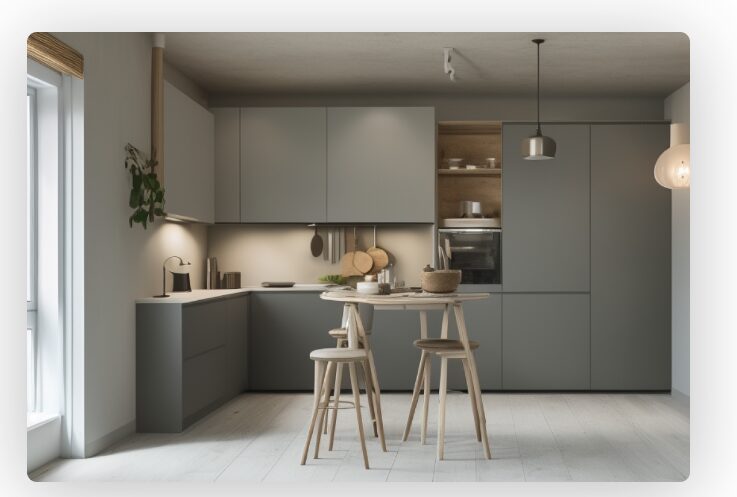
The idea of redesigning a room in just one hour may sound ambitious, but with the right tools and a clear plan, it becomes an exciting and achievable creative mission. The Planner5D Room Design Challenge is all about using smart digital tools to turn imagination into a realistic visual concept within a limited time frame. Whether you are refreshing a bedroom, upgrading a living room, or rethinking a home office, Planner5D empowers anyone to take control of their home design journey without needing professional technical skills.
In today’s fast-moving world, interior design is no longer limited to architects and decorators. Digital platforms have opened doors for homeowners, renters, students, and creators to experiment with layouts, colors, textures, and furniture placement. With advanced 3D modeling and intuitive floor planning features, Planner5D makes it possible to visualize changes instantly. The one-hour challenge is not about rushing creativity but about focusing your ideas, eliminating overthinking, and making confident design decisions.
Home design begins with a vision. Maybe you want a cozy minimalist bedroom, a bold modern living room, or a functional yet stylish workspace. The challenge encourages you to clarify your goal before you start. Ask yourself what the room should feel like. Should it inspire productivity, relaxation, creativity, or social connection? Once you identify the purpose, the rest of the interior design process becomes smoother. Planner5D allows you to start from scratch or use templates that speed up the initial setup, making your one-hour transformation realistic and exciting.
The beauty of using 3D modeling is that you are not guessing how your ideas will look. You see them come to life. Walls can be resized, furniture can be rearranged, and materials can be swapped in seconds. This instant visualization reduces uncertainty and builds confidence. Instead of imagining whether a sofa will fit or if a layout feels crowded, you can test everything virtually before making real-world changes. This makes the Planner5D challenge both creative and practical.
Preparing for the Planner5D Room Design Challenge

Success in a one-hour home design challenge depends on preparation. Before opening the software, take a few minutes to measure your room. Accurate measurements are the foundation of effective floor planning. Note the length and width of the space, ceiling height, window positions, and door placements. This information ensures that your 3D modeling project reflects reality as closely as possible.
Once measurements are ready, think about your design style. Interior design becomes more efficient when you define a theme. It could be modern, Scandinavian, industrial, bohemian, classic, or minimalist. Choosing a direction prevents you from wasting time experimenting with conflicting styles. Planner5D offers a wide range of furniture and decor items categorized by design type, making it easier to stick to your chosen theme during the challenge.
Another important step is prioritization. In a one-hour challenge, you cannot perfect every detail. Focus on the key elements of home design: layout, major furniture pieces, wall colors, flooring, and lighting. Smaller accessories can be added later if time allows. By concentrating on the foundation, you ensure that your interior design transformation feels complete even if you do not add every decorative item.
Set a timer once you begin. The countdown creates positive pressure that keeps you focused. Start with floor planning. Draw the room dimensions inside Planner5D, position doors and windows accurately, and check that everything matches your real space. This stage may take fifteen to twenty minutes, but it sets the structure for everything that follows. A strong layout is the backbone of successful 3D modeling and prevents mistakes later in the process.
Executing the One-Hour Transformation with Smart 3D Modeling
After completing the floor planning stage, move directly into furniture placement. Begin with the largest pieces such as beds, sofas, desks, wardrobes, or dining tables. In interior design, large items anchor the room and determine traffic flow. With Planner5D’s 3D modeling features, you can drag and drop furniture into position and instantly adjust orientation, size, and spacing.
Think about movement. A well-designed home design layout allows people to walk comfortably without obstacles. Ensure that there is enough clearance around beds, between sofas and tables, and near doorways. The advantage of digital planning is that you can test multiple arrangements quickly. If one layout feels cramped, rotate the furniture or reposition it within seconds.
Next, focus on color and materials. Walls and flooring significantly influence the atmosphere of a space. Light tones create openness and brightness, while darker shades add drama and intimacy. In Planner5D, you can experiment with various textures such as wood, marble, concrete, or fabric finishes. This stage of 3D modeling helps you understand how different materials interact with lighting and furniture.
Lighting is often underestimated in home design, yet it dramatically changes perception. Use layered lighting principles in your interior design plan. Combine ceiling lights, floor lamps, and accent lighting to create depth. Within the software, switching between 2D floor planning mode and 3D modeling mode allows you to see how light affects shadows and mood. This visualization makes your one-hour challenge feel professional and realistic.
As the timer moves closer to the final minutes, refine proportions and alignment. Straighten rugs, center artwork, and balance symmetry. These small adjustments elevate the overall interior design quality. Even in a time-limited challenge, attention to alignment and spacing can make the difference between an average layout and a polished concept.
Maximizing Creativity and Efficiency During the Challenge
The Planner5D Room Design Challenge is not only about speed; it is also about creativity. To maximize both, avoid perfectionism. Home design thrives on experimentation. If an idea does not work, delete it and try something new. The flexibility of 3D modeling encourages bold decisions without financial risk.
Use inspiration wisely. Before starting, gather references from magazines, online galleries, or social platforms. Instead of copying, identify patterns such as color combinations, furniture arrangements, or decorative themes. Apply these ideas within your floor planning framework. This method keeps you inspired while maintaining originality.
Efficiency also comes from understanding scale. Many beginners struggle in interior design because they select furniture that is too large or too small for the room. Planner5D provides measurement guides that help you maintain realistic proportions. When your home design elements are scaled correctly, the space feels harmonious and practical.
Another technique to enhance your one-hour transformation is zoning. Divide the room into functional areas. In a studio apartment, for example, you might create a sleeping zone, a working zone, and a relaxation zone. Through careful floor planning and 3D modeling, you can visually separate these areas using rugs, shelving units, or lighting variations. Zoning increases both functionality and aesthetic appeal.
Finally, save multiple versions of your design if time permits. Comparing variations side by side helps you decide which layout feels strongest. The challenge format pushes you to make quick decisions, but reviewing alternatives for a few minutes can clarify your final choice. Planner5D makes it easy to duplicate projects and test new ideas without starting from zero.
From Virtual Concept to Real-World Interior Design Success
Completing the Planner5D Room Design Challenge in one hour is only the beginning. Once your digital home design is finished, take time to evaluate it calmly. Switch to full 3D modeling view and explore the room from different angles. Imagine walking through the space. Does it feel balanced, functional, and visually pleasing?
Share your design with friends or family for feedback. Fresh perspectives can reveal opportunities for improvement. Sometimes a simple suggestion about color contrast or furniture placement enhances the overall interior design impact. Because your concept is built through detailed floor planning, adjustments can be made quickly.
When you feel confident, you can begin implementing changes in your actual space. One of the biggest advantages of using Planner5D for home design is reduced uncertainty. You already know how the room should look, which minimizes costly mistakes. Whether you are purchasing new furniture, repainting walls, or rearranging existing items, your 3D modeling plan acts as a reliable blueprint.
The one-hour challenge also builds valuable design skills. Repeating the exercise for different rooms strengthens your understanding of scale, proportion, and composition. Over time, your interior design decisions become faster and more intuitive. What once felt overwhelming becomes an enjoyable creative routine.
Ultimately, the Planner5D Room Design Challenge proves that impactful home design does not require months of planning. With accurate floor planning, thoughtful interior design principles, and the power of 3D modeling, transformation can begin in just sixty minutes. The process encourages clarity, creativity, and confidence.
Every room holds potential waiting to be unlocked. By accepting the challenge, you step into the role of designer, architect, and visionary. In a single focused hour, you can reshape your environment, reimagine possibilities, and move closer to a home that reflects your personality and lifestyle. Planner5D becomes more than a tool; it becomes a creative partner in your journey toward better living spaces.